
K8S-12_实现L7负载均衡(Ingress)
# 理论基础
Ingress (opens new window) 公开了从集群外部到集群内服务 (opens new window)的 HTTP 和 HTTPS 路由。 流量路由由 Ingress 资源上定义的规则控制。
下面是一个将所有流量都发送到同一 Service 的简单 Ingress 示例:
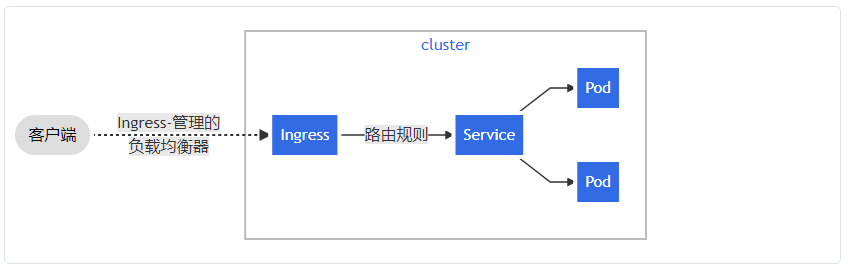
使用Ingress的重要原因是,每个service如果希望暴露给集群外部都需要一个负载均衡器以及一个独有的公网IP地址,而Ingress只需要一个公网IP地址就能为许多服务提供访问。如下图所示:
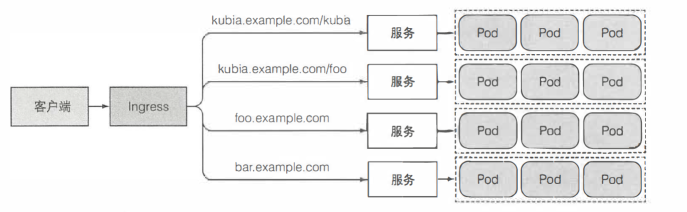
要使用Ingress,必须要有Ingress控制器,K8S支持多种Ingress控制器,常用的有HAProxy 与 Nginx控制器。
# 安装Ingress 控制器
参考官网:
https://kubernetes.github.io/ingress-nginx/deploy/
Helm公网安装最新版本(要搭梯子下载镜像):
helm repo add ingress-nginx https://kubernetes.github.io/ingress-nginx
helm repo update
helm show values ingress-nginx/ingress-nginx >ingress-values.yaml
helm install myingress ingress-nginx/ingress-nginx --values ingress-values.yaml -n ingress-nginx
2
3
4
# Ingress使用范例
# 创建两个测试用的Pod
[root@clientvm ~]# kubectl run nginx1 --image=nginx --image-pull-policy='IfNotPresent'
pod/nginx1 created
[root@clientvm ~]# kubectl run nginx2 --image=nginx --image-pull-policy='IfNotPresent'
pod/nginx2 created


[root@clientvm service]# kubectl get pod
NAME             READY   STATUS    RESTARTS   AGE
nginx1           1/1     Running   0          81m
nginx2           1/1     Running   0          81m
nginx3-default   1/1     Running   0          3m19s

[root@clientvm ~]# kubectl expose pod nginx1 --port=80 --target-port=80
service/nginx1 exposed
[root@clientvm ~]# kubectl expose pod nginx2 --port=80 --target-port=80
service/nginx2 exposed


[root@clientvm service]# kubectl get svc
NAME             TYPE        CLUSTER-IP       EXTERNAL-IP   PORT(S)   AGE
kubernetes       ClusterIP   10.96.0.1        <none>        443/TCP   128m
nginx1           ClusterIP   10.107.202.107   <none>        80/TCP    81m
nginx2           ClusterIP   10.100.175.93    <none>        80/TCP    81m
2
3
4
5
6
7
8
9
10
11
12
13
14
15
16
17
18
19
20
21
22
23
24
# 修改Nginx Web页面
[root@clientvm ~]# kubectl exec nginx1 -it -- bash
root@nginx1:/# echo AAAAAA >/usr/share/nginx/html/index.html
root@nginx1:/# exit
exit
[root@clientvm ~]# kubectl exec nginx2 -it -- bash
root@nginx2:/# echo BBBBBB >/usr/share/nginx/html/index.html
root@nginx2:/# exit
exit
2
3
4
5
6
7
8
# 到Master或worker主机上验证
[root@master ~]# curl 10.105.82.83
AAAAAA
[root@master ~]# curl 10.103.158.125
BBBBBB
2
3
4
# 创建Ingress
# 虚拟主机
[root@clientvm service]# cat ingress-multi-hosts.yaml
apiVersion: networking.k8s.io/v1
kind: Ingress
metadata:
  name: name-virtual-host-ingress
spec:
  ingressClassName: nginx
  defaultBackend:
    service:
      name: nginx1
      port:
        number: 80
  rules:
  - host: nginx1.example.com
    http:
      paths:
      - path: /
        pathType: Prefix
        backend:
          service:
            name: nginx1
            port:
              number: 80
  - host: nginx2.example.com
    http:
      paths:
      - pathType: Prefix
        path: "/"
        backend:
          service:
            name: nginx2
            port:
              number: 80

[root@clientvm service]# kubectl apply -f ingress-multi-hosts.yaml

[root@clientvm service]# kubectl get ingress
NAME                        CLASS   HOSTS                                   ADDRESS   PORTS   AGE
name-virtual-host-ingress   nginx   nginx1.example.com,nginx2.example.com             80      15m
2
3
4
5
6
7
8
9
10
11
12
13
14
15
16
17
18
19
20
21
22
23
24
25
26
27
28
29
30
31
32
33
34
35
36
37
38
39
40
测试:
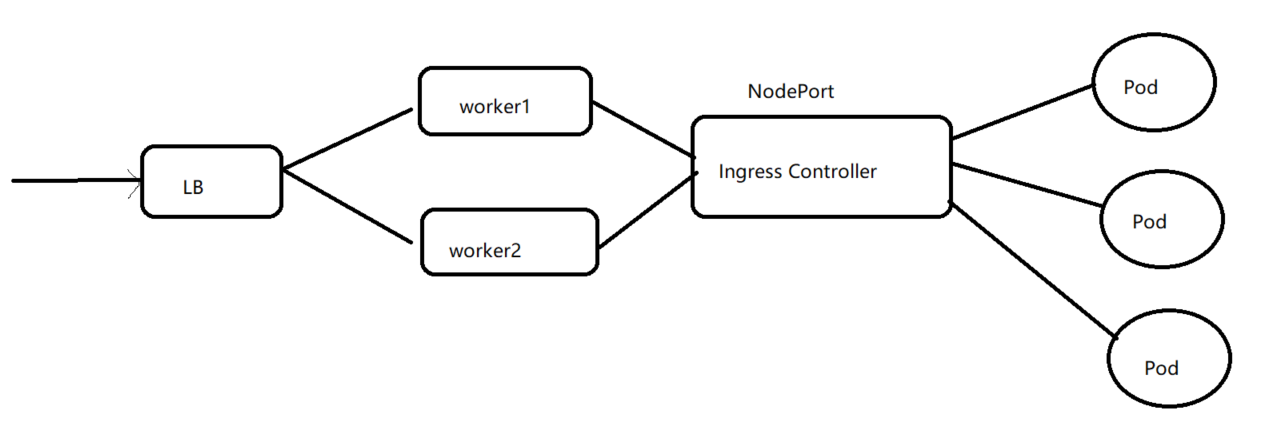
在clientvm上使用vi修改LB的文件,使用ingress 的service的HostPort替换以下的80端口:
[root@clientvm ~]# setenforce 0
[root@clientvm service]# tail -4 /etc/haproxy/haproxy.cfg
    balance roundrobin
    server worker1 worker1:80 check
    server worker2 worker2:80 check
[root@clientvm service]# systemctl restart haproxy.service

#到worker1修改/etc/hosts,增加一行
[root@worker1 ~]# cat /etc/hosts
......
192.168.241.134 clientvm.example.com clientvm nginx1.example.com nginx2.example.com

#验证:
[root@worker1 ~]# curl http://nginx1.example.com/
AAAAAA
[root@worker1 ~]# curl http://nginx2.example.com/
BBBBBB
2
3
4
5
6
7
8
9
10
11
12
13
14
15
16
17
# annotations的作用
Ingress 经常使用注解(annotations)来配置一些选项,具体取决于 Ingress 控制器,例如 重写目标注解 (opens new window)。 不同的 Ingress 控制器 (opens new window) 支持不同的注解。查看文档以供你选择 Ingress 控制器,以了解支持哪些注解。
参考:https://github.com/kubernetes/ingress-nginx/blob/master/docs/examples/rewrite/README.md
范例 1:
ingress-nginx Version 0.22.0版本以后
  annotations:
    nginx.ingress.kubernetes.io/rewrite-target: /$2
......
spec:
  rules:
  - host: rewrite.bar.com
    http:
      paths:
      - backend:
          serviceName: http-svc
          servicePort: 80
        path: /something(/|$)(.*)
2
3
4
5
6
7
8
9
10
11
12
(.*)捕获的任何字符都将被分配给占位符$2,然后将其作为重写目标注释中的参数使用
上面的输入定义将导致以下重写:
rewrite.bar.com/somethingrewrites torewrite.bar.com/rewrite.bar.com/something/rewrites torewrite.bar.com/rewrite.bar.com/something/newrewrites torewrite.bar.com/newrewrite.bar.com/将会匹配错误,因为没有匹配上预定义path /something
范例 2:
在上例的基础上增加如下
  annotations:
    nginx.ingress.kubernetes.io/app-root: /something/
2
任何对http://rewrite.bar.com/ 的访问都定向到http://rewrite.bar.com/something/
范例3:
  annotations:
    kubernetes.io/ingress.class: "nginx"
2
使用ingress class: nginx
此功能在1.22版本上已经废弃,被替换为
spec:
  ingressClassName: nginx
2